Skip to content
Indian Font Converters

Popular

Type a font name in English or in its own script. Search runs in your browser on a prebuilt index; nothing you type is sent anywhere.

NepalidevanagariUnicode → Legacy

Unicode to Preeti Converter

Turn Unicode Nepali like “नेपालमा” into Preeti keystrokes for Word and DTP software, and see exactly which characters the font can’t show.

0 chars0 words
<1 ms
Live conversion Private
20
  • Runs on your device

    Nothing is uploaded. Works offline once loaded.

  • Both directions

    Swap to go Preeti → Unicode in one click.

  • Loss report

    Characters a font can’t show are flagged, not dropped.

  • 149 mappings

    Every one is listed in the chart below.

01 · About the font

Preeti, in plain words.

Nepal’s best-known legacy font: the Devanagari typeface behind years of Nepali newspaper layout, office paperwork and typing practice.

Preeti is a legacy Nepali font from the DTP era. Like Kruti Dev for Hindi, it draws Devanagari on top of English keys: typed on a normal keyboard, it stores “g]kfn” in the file and shows “नेपाल” on screen only when the font is installed.

It became the usual choice for a great deal of Nepali word processing and newspaper layout, and related Nepali fonts (including Kantipur, Sagarmatha and Himalb) use similar but not identical key assignments. Nepali typing-practice tools are commonly built around the Preeti keyboard.

Nepal’s digital services increasingly use Unicode, which is why so many people now need to bring Preeti documents into Unicode for websites, mobile phones and online forms.

Unicode (as typed)

नेपालमा हिमाल छ।

Preeti keystrokes (converted by this page)

g]kfndf lxdfn 5.

This sample is converted with the same engine as the tool above, when this page was built, and matches the expected text exactly.

Who still uses it

  • 01

    Public service commission candidates

    Typing tests for civil-service posts have often used Preeti. Requirements are set per advertisement, so check the official notice for your post.

  • 02

    Newspapers, magazines and publishers

    Layout files and archives made in Preeti, some of which are now being republished online.

  • 03

    Government offices

    Letters, circulars and records typed in Preeti that must move to Unicode for portals and email.

  • 04

    Web editors and students

    Anyone copying Preeti text into a CMS, Google Docs or WhatsApp and seeing English letters.

02 · How to

How to convert Unicode to Preeti (4 steps)

Some printers, layout programs and typing-test environments still need text in Preeti. This converter writes the exact keystrokes the font expects and lists any characters the font cannot show, so nothing is lost without you knowing.

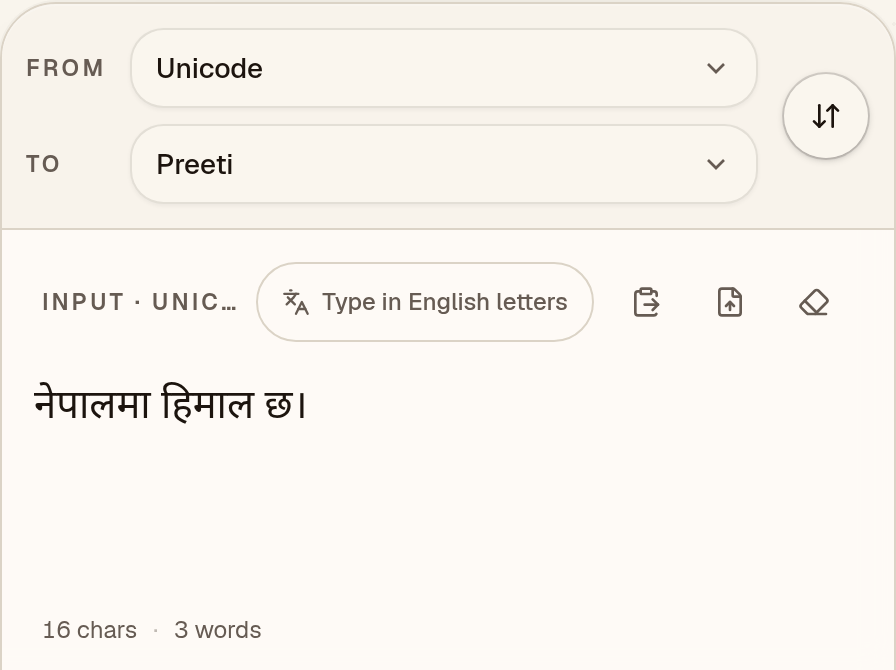
  1. Paste your Unicode Nepali

    Check that “To” says Preeti, then paste Unicode Nepali such as “नेपालमा हिमाल छ।” from Word, Google Docs or WhatsApp.
    Unicode to Preeti converter with “To” set to Preeti and the Unicode Nepali sample “नेपालमा हिमाल छ।” in the input box
  2. Read the Preeti keystrokes

    The output is the keystrokes Preeti expects: “g]kfndf lxdfn 5.”. It looks like English letters until the Preeti font is applied. Characters the font can’t show are flagged under “notes”; this sample has none.
    Output box showing the Unicode Nepali sample converted to Preeti keystrokes: “g]kfndf lxdfn 5.”
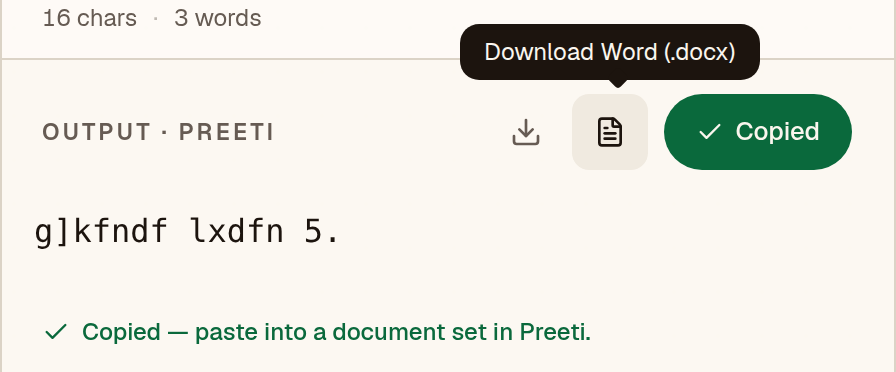
  3. Copy it into a Preeti document

    After you copy “g]kfndf lxdfn 5.”, the converter reminds you to paste it into a document set in Preeti. The text shows as Nepali only where that font is installed.
    Unicode to Preeti converter after Copy, with the message “Copied — paste into a document set in Preeti.”
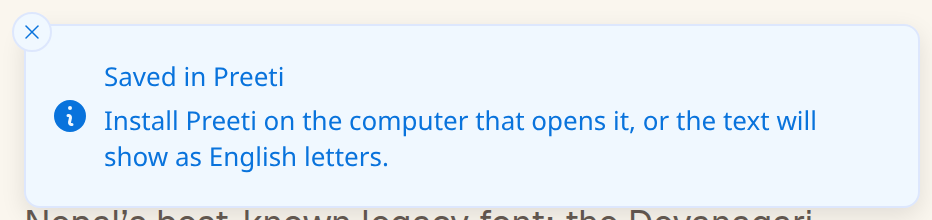
  4. Or save a Word file

    The Word button saves a .docx already set in Preeti. Install Preeti on the computer that opens it, or “g]kfndf lxdfn 5.” will show as English letters.
    Notice after the Word download: “Saved in Preeti. Install Preeti on the computer that opens it, or the text will show as English letters.”

Have a whole document instead of a paragraph? The Word file converter keeps tables, bold text and layout.

03 · Worked example

One sentence, step by step.

This is the real output of the converter above for the sentence below, generated when the page was built. It reads back to the same Unicode with no warnings.

Unicode (typed)

संविधानको धारा अनुसार निर्णय

Preeti keystrokes (converted)

;+ljwfgsf] wf/f cg';f/ lg0f{o

What to look for in the output

  • विlj

    The short-i matra becomes the letter l, typed before the consonant j.

  • र्ण0f{

    The reph is stored before ण in Unicode; in Preeti it follows the syllable as {.

  • ं+

    The anusvara is the plus sign + in Preeti.

04 · Loss report

Characters Preeti can’t show.

We ran this converter over every assigned character of the Devanagari block (U+0900–097F), 128 in all, one at a time. Marks that need a base letter were tested on क. 85 of them convert and decode back to the same character (66%); the other 43 have no glyph in Preeti. The engine keeps them as Unicode in the output and flags them, so you can fix the source text before it goes to print. Not tested: Devanagari Extended (U+A8E0–A8FF) and Vedic Extensions (U+1CD0–1CFF).

Exact
84
With a note
1
Can’t show
43

The 43 characters with no Preeti glyph

  • कऀU+0900
  • ऄU+0904
  • ऌU+090C
  • ऍU+090D
  • ऎU+090E
  • ऑU+0911
  • ऒU+0912
  • ळU+0933
  • कऺU+093A
  • कऻU+093B
  • कॄU+0944
  • कॆU+0946
  • कॉU+0949
  • कॊU+094A
  • कॎU+094E
  • कॏU+094F
  • क॑U+0951
  • क॒U+0952
  • क॓U+0953
  • क॔U+0954
  • कॕU+0955
  • कॖU+0956
  • कॗU+0957
  • ॠU+0960
  • ॡU+0961
  • कॢU+0962
  • कॣU+0963
  • ॰U+0970
  • ॱU+0971
  • ॲU+0972
  • ॳU+0973
  • ॴU+0974
  • ॵU+0975
  • ॶU+0976
  • ॷU+0977
  • ॸU+0978
  • ॹU+0979
  • ॺU+097A
  • ॻU+097B
  • ॼU+097C
  • ॽU+097D
  • ॾU+097E
  • ॿU+097F

Letters shown on a base consonant are combining marks. Most entries are historic, regional or Vedic additions to the block; check the list before you type a name that uses one.

Converted, with a note (1)

These characters do convert and read back correctly. The engine adds a note because they are written by combining or reordering other glyphs: ऴ. Check the result against the original if accuracy matters.

05 · Print & DTP

Using the output in Word, CorelDRAW and PageMaker.

The converted text is ordinary Latin characters. It only looks like Devanagari once Preeti is applied, so the same font must be installed wherever the file is opened or printed. These are general steps: menu names may differ by version.

Microsoft Word

  1. 1In Word’s font box, Preeti may be listed as “preeti”. Pick the name your installed copy shows.
  2. 2Turn off spell-check for the pasted text (Review → Language → Set Proofing Language → Do not check spelling or grammar). Word sees Latin letters and underlines everything.
  3. 3If you edit the text by typing, also turn off AutoCorrect’s “smart quotes”: legacy fonts use the straight ' and " keys for letters, and curly quotes are different characters.
  4. 4Before you send a PDF, check that it really contains the font: open it on a computer without Preeti, or look under File → Properties → Fonts in Acrobat Reader.

Menu names and the PDF options may differ by Word version and platform.

CorelDRAW

  1. 1Choose the Text tool and set the font to Preeti before you paste, or select the pasted text afterwards and change it.
  2. 2If CorelDRAW offers to keep or discard the source fonts and formatting when you paste text, choose the option that applies the font you picked rather than the one from the clipboard.
  3. 3Use the font box on the property bar to confirm the text really is in Preeti; legacy text in a Unicode font looks like random Latin letters.
  4. 4Before sending the file to a printer, convert text to curves or embed fonts, depending on what the printer asks for.

Dialog wording and the way fonts are embedded may differ by CorelDRAW version.

Adobe PageMaker

  1. 1Select the Text tool, click into a text block and choose Preeti from the Type → Font menu.
  2. 2Paste the converted text as plain text so the legacy characters are not restyled by the clipboard.
  3. 3Send the printer the publication together with the font file, or ask them to install the same font version; a different version of the same-named font can place a few characters differently.

PageMaker is no longer sold or updated by Adobe, so check which version your printer still uses. Menu names may differ by version.

06 · Exams & submissions

Before you submit or print.

Requirements for fonts, keyboard layouts and file types are set by each exam body, office or press and change over time. We do not list them; a short checklist that applies to any of them:

  1. Check the official notice first

    Whether an exam, office or tender asks for Preeti, for Unicode, or for a particular keyboard layout differs by recruiting body and year. Read the current official notice for the font name, the layout and the file format before you convert anything.

  2. Convert, then compare against the original

    Convert the Unicode source to Preeti, paste it into the document with Preeti selected, and read it against the original on screen. Anything the loss report flags is not in the font; fix it in the source rather than hoping it prints.

  3. Keep the Unicode source

    Keep your Unicode original. If a notice changes, a reviewer needs searchable text, or the legacy file is damaged, you can convert again; a Preeti file cannot be searched or read on a phone without Preeti.

  4. Test the printed or exported copy

    Open the exported PDF or print a page before the deadline. If the notice requires a file type, convert and test on the same type of device the recipient will use.

07 · Output font

Set the output font to Preeti in MS Word

The converted text is Preeti keystrokes, so it only looks like Nepali when the Preeti font is applied. It has to be installed on the computer that opens the file.

Microsoft Word

  1. 1Install Preeti if you haven’t already (on Windows, right-click the font file → Install for all users; on Mac, use Font Book), then restart Word.
  2. 2Paste the converted text. Use Paste Special → Unformatted Text (Ctrl+Alt+V) so no formatting from the source comes along.
  3. 3Select the text and type “Preeti” into the font box on the Home tab.
  4. 4Before sending the file to someone else, either embed fonts (File → Options → Save → Embed fonts) or export to PDF.

Google Docs

  1. 1Google Docs offers its own font list only, so Preeti cannot be selected there.
  2. 2Use Word or LibreOffice for the final file, then share a PDF if others need to read it.
  3. 3If the text must live in Google Docs, keep it as Unicode and convert only the final copy.

Pasting Preeti text into Google Docs shows English letters instead of Nepali.

08 · Mapping chart

Every key, and the letter it makes.

This is the actual table the converter uses, generated from the engine. Search for a key you see in garbled text, or for a letter you want to type.

149 mappings

Click a letter to copy the Unicode character. Click the key cap to copy the Preeti key.

09 · Known limits

What to watch for.

  • Nepali and Hindi share the Devanagari script, but a Preeti document cannot be converted with a Hindi converter. The key assignments are different.
  • Related fonts such as Kantipur, Sagarmatha and Himalb have their own mappings. Check the font name before choosing a converter.
  • As with other visual-order fonts, the short-i matra and the reph (र्) must be repositioned. The converter does this per syllable.
  • Web addresses, email addresses and words already in Unicode are left as they are. When you paste, an English word is kept only if it cannot be Preeti text; many English words are also valid Preeti keystrokes and get converted, so check mixed text. Plain digits are Preeti letters (5 is छ), so check any number typed in an English font.

Coverage in this converter

  • Consonants33
  • Half forms29
  • Conjuncts27
  • Punctuation18
  • Vowels11
  • Vowel signs11
  • Digits10
  • Signs9
  • Nukta1

Compared with nepali-fonts on 240 conversions, 240 matched exactly. Round trip: we converted 50,757 Devanagari test strings (word-list words, sentences, and every consonant, vowel sign, conjunct, reph and nukta combination) to Preeti and back. 50,755 came back exactly; the other 2 contain a character Preeti has no glyph for, which the converter flags. See the accuracy page for every difference.

10 · FAQ

Questions about Unicode to Preeti

Why convert Nepali Unicode to Preeti?

Mostly for typing practice and for offices or press layouts that still require Preeti. After converting, set the text in the Preeti font; it will look like English letters without it.

Will Nepali letters be lost?

Letters that Preeti has no key for are flagged in the loss report instead of being silently removed. Check the report before you submit.

Is my Nepali text uploaded to a server?

No. The conversion runs in your browser, and nothing you paste is sent anywhere.

Can I turn Preeti text back into Unicode later?

Yes. Paste it into the Preeti to Unicode converter, or press the swap button above. Characters the loss report flagged were kept as Unicode, so they come back unchanged.

How accurate is the Preeti converter?

In our tests it agreed exactly with nepali-fonts on all 240 conversions. The sample on this page converts exactly as expected. No fluent-speaker review has been done, so read important text before you print or submit it.

Which characters can’t Preeti show?

43 of the 128 assigned characters in the Unicode Devanagari block (U+0900–097F) have no Preeti glyph; the other 85 convert and read back unchanged. Characters it can’t show are kept as Unicode in the output and flagged, and the full list is on this page. Not tested: Devanagari Extended (U+A8E0–A8FF) and Vedic Extensions (U+1CD0–1CFF).