Skip to content
Indian Font Converters

Popular

Type a font name in English or in its own script. Search runs in your browser on a prebuilt index; nothing you type is sent anywhere.

TamilUnicode → Legacy

Unicode to Bamini Converter

Turn Unicode Tamil like “தமிழ்” into Bamini keystrokes for Word and DTP software, and see exactly which characters the font can’t show.

0 chars0 words
<1 ms
Live conversion Private
20
  • Runs on your device

    Nothing is uploaded. Works offline once loaded.

  • Both directions

    Swap to go Bamini → Unicode in one click.

  • Loss report

    Characters a font can’t show are flagged, not dropped.

  • 297 mappings

    Every one is listed in the chart below.

01 · About the font

Bamini, in plain words.

A Tamil legacy font long used in Sri Lankan Tamil publishing, and by printers and typists in Tamil Nadu and the diaspora.

Bamini is a Tamil ASCII font family. Tamil is typed on a normal keyboard in Bamini, the file stores English letters, and the font draws Tamil. Its layout follows the Tamil typewriter keyboard, which made it a natural fit for typists trained on typewriters.

Tamil carried several competing legacy encodings before Unicode became dominant: TSCII, TAB/TAM, Bamini, Vanavil, Kalaham and others. A document is only readable in the font it was typed in, so choosing the right converter matters. Bamini is not interchangeable with TSCII or TAB.

Tamil’s pre-base vowel signs (ெ, ே, ை) and split vowels (ொ, ோ, ௌ) are typed before the consonant in Bamini, and Unicode needs them after it. This reordering is the main reason a simple find-and-replace produces broken Tamil.

Unicode (as typed)

தமிழ்

Bamini keystrokes (converted by this page)

jkpo;

This sample is converted with the same engine as the tool above, when this page was built, and matches the expected text exactly.

Who still uses it

  • 01

    Sri Lankan Tamil publishing

    Newspapers, magazines and books that were set in Bamini, plus the archives they left behind.

  • 02

    Printers and DTP shops

    Tamil layouts in older design software that expect Bamini text.

  • 03

    Schools, temples and community groups

    Notices, hymn books and handouts typed in Bamini that now need to be shared on phones.

  • 04

    The Tamil diaspora

    Family and community archives that predate Unicode.

02 · How to

How to convert Unicode to Bamini (4 steps)

Some printers, layout programs and typing-test environments still need text in Bamini. This converter writes the exact keystrokes the font expects and lists any characters the font cannot show, so nothing is lost without you knowing.

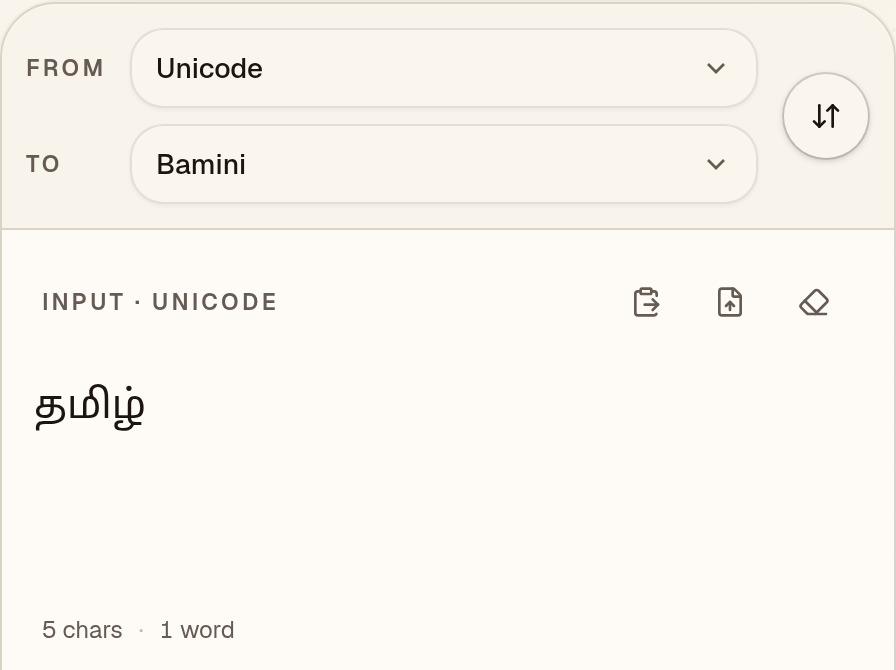
  1. Paste your Unicode Tamil

    Check that “To” says Bamini, then paste Unicode Tamil such as “தமிழ்” from Word, Google Docs or WhatsApp.
    Unicode to Bamini converter with “To” set to Bamini and the Unicode Tamil sample “தமிழ்” in the input box
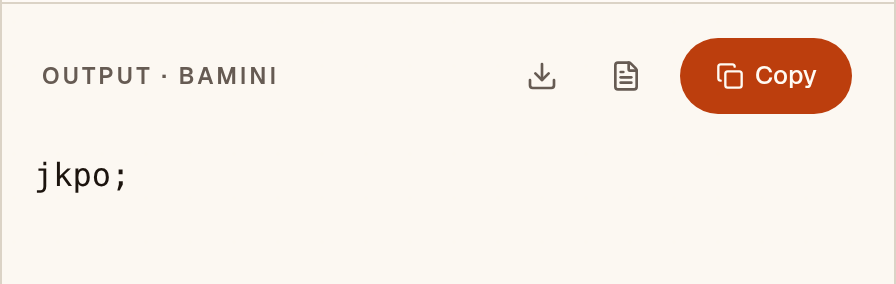
  2. Read the Bamini keystrokes

    The output is the keystrokes Bamini expects: “jkpo;”. It looks like English letters until the Bamini font is applied. Characters the font can’t show are flagged under “notes”; this sample has none.
    Output box showing the Unicode Tamil sample converted to Bamini keystrokes: “jkpo;”
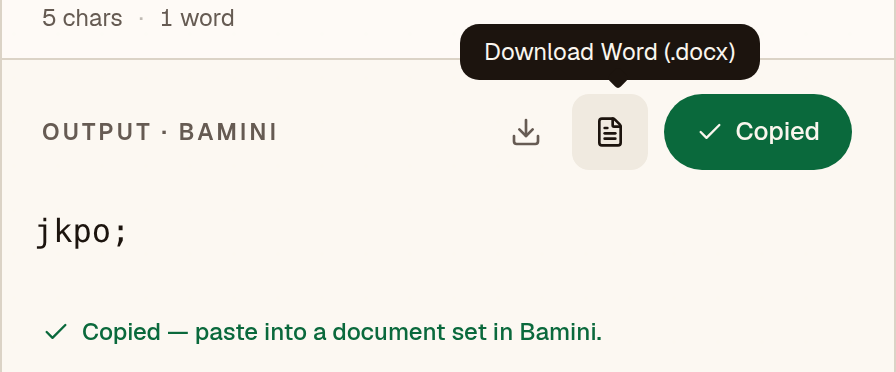
  3. Copy it into a Bamini document

    After you copy “jkpo;”, the converter reminds you to paste it into a document set in Bamini. The text shows as Tamil only where that font is installed.
    Unicode to Bamini converter after Copy, with the message “Copied — paste into a document set in Bamini.”
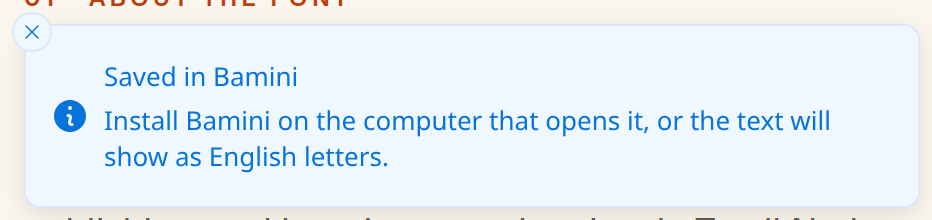
  4. Or save a Word file

    The Word button saves a .docx already set in Bamini. Install Bamini on the computer that opens it, or “jkpo;” will show as English letters.
    Notice after the Word download: “Saved in Bamini. Install Bamini on the computer that opens it, or the text will show as English letters.”

Have a whole document instead of a paragraph? The Word file converter keeps tables, bold text and layout.

03 · Worked example

One sentence, step by step.

This is the real output of the converter above for the sentence below, generated when the page was built. It reads back to the same Unicode with no warnings.

Unicode (typed)

தமிழ்நாடு கொடி கௌதமன்

Bamini keystrokes (converted)

jkpo;ehL nfhb nfsjkd;

What to look for in the output

  • கொnfh

    The split vowel ொ is written around the consonant (a pre-base ெ and a post-base ா) and rebuilt as one logical vowel sign in Unicode.

  • கௌnfs

    The two-part vowel ௌ is also assembled around the consonant in Bamini.

  • ழ்o;

    The pulli (virama) is a separate character typed right after the consonant, as in ழ் here.

04 · Loss report

Characters Bamini can’t show.

We ran this converter over every assigned character of the Tamil block (U+0B80–0BFF), 72 in all, one at a time. Marks that need a base letter were tested on க. 47 of them convert and decode back to the same character (65%); the other 25 have no glyph in Bamini. The engine keeps them as Unicode in the output and flags them, so you can fix the source text before it goes to print. Not tested: Tamil Supplement (U+11FC0–11FFF, historic characters).

Exact
47
With a note
0
Can’t show
25

The 25 characters with no Bamini glyph

  • கஂU+0B82
  • ஶU+0BB6
  • ௐU+0BD0
  • கௗU+0BD7
  • ௦U+0BE6
  • ௧U+0BE7
  • ௨U+0BE8
  • ௩U+0BE9
  • ௪U+0BEA
  • ௫U+0BEB
  • ௬U+0BEC
  • ௭U+0BED
  • ௮U+0BEE
  • ௯U+0BEF
  • ௰U+0BF0
  • ௱U+0BF1
  • ௲U+0BF2
  • ௳U+0BF3
  • ௴U+0BF4
  • ௵U+0BF5
  • ௶U+0BF6
  • ௷U+0BF7
  • ௸U+0BF8
  • ௹U+0BF9
  • ௺U+0BFA

Letters shown on a base consonant are combining marks. Most entries are historic, regional or Vedic additions to the block; check the list before you type a name that uses one.

05 · Print & DTP

Using the output in Word, CorelDRAW and PageMaker.

The converted text is ordinary Latin characters. It only looks like Tamil once Bamini is applied, so the same font must be installed wherever the file is opened or printed. These are general steps: menu names may differ by version.

Microsoft Word

  1. 1In Word’s font box, Bamini may be listed as “bamini”. Pick the name your installed copy shows.
  2. 2Turn off spell-check for the pasted text (Review → Language → Set Proofing Language → Do not check spelling or grammar). Word sees Latin letters and underlines everything.
  3. 3If you edit the text by typing, also turn off AutoCorrect’s “smart quotes”: legacy fonts use the straight ' and " keys for letters, and curly quotes are different characters.
  4. 4Before you send a PDF, check that it really contains the font: open it on a computer without Bamini, or look under File → Properties → Fonts in Acrobat Reader.

Menu names and the PDF options may differ by Word version and platform.

CorelDRAW

  1. 1Choose the Text tool and set the font to Bamini before you paste, or select the pasted text afterwards and change it.
  2. 2If CorelDRAW offers to keep or discard the source fonts and formatting when you paste text, choose the option that applies the font you picked rather than the one from the clipboard.
  3. 3Use the font box on the property bar to confirm the text really is in Bamini; legacy text in a Unicode font looks like random Latin letters.
  4. 4Before sending the file to a printer, convert text to curves or embed fonts, depending on what the printer asks for.

Dialog wording and the way fonts are embedded may differ by CorelDRAW version.

Adobe PageMaker

  1. 1Select the Text tool, click into a text block and choose Bamini from the Type → Font menu.
  2. 2Paste the converted text as plain text so the legacy characters are not restyled by the clipboard.
  3. 3Send the printer the publication together with the font file, or ask them to install the same font version; a different version of the same-named font can place a few characters differently.

PageMaker is no longer sold or updated by Adobe, so check which version your printer still uses. Menu names may differ by version.

06 · Exams & submissions

Before you submit or print.

Requirements for fonts, keyboard layouts and file types are set by each exam body, office or press and change over time. We do not list them; a short checklist that applies to any of them:

  1. Check the official notice first

    Whether an exam, office or tender asks for Bamini, for Unicode, or for a particular keyboard layout differs by recruiting body and year. Read the current official notice for the font name, the layout and the file format before you convert anything.

  2. Convert, then compare against the original

    Convert the Unicode source to Bamini, paste it into the document with Bamini selected, and read it against the original on screen. Anything the loss report flags is not in the font; fix it in the source rather than hoping it prints.

  3. Keep the Unicode source

    Keep your Unicode original. If a notice changes, a reviewer needs searchable text, or the legacy file is damaged, you can convert again; a Bamini file cannot be searched or read on a phone without Bamini.

  4. Test the printed or exported copy

    Open the exported PDF or print a page before the deadline. If the notice requires a file type, convert and test on the same type of device the recipient will use.

07 · Output font

Set the output font to Bamini in MS Word

The converted text is Bamini keystrokes, so it only looks like Tamil when the Bamini font is applied. It has to be installed on the computer that opens the file.

Microsoft Word

  1. 1Install Bamini if you haven’t already (on Windows, right-click the font file → Install for all users; on Mac, use Font Book), then restart Word.
  2. 2Paste the converted text. Use Paste Special → Unformatted Text (Ctrl+Alt+V) so no formatting from the source comes along.
  3. 3Select the text and type “Bamini” into the font box on the Home tab.
  4. 4Before sending the file to someone else, either embed fonts (File → Options → Save → Embed fonts) or export to PDF.

Google Docs

  1. 1Google Docs offers its own font list only, so Bamini cannot be selected there.
  2. 2Use Word or LibreOffice for the final file, then share a PDF if others need to read it.
  3. 3If the text must live in Google Docs, keep it as Unicode and convert only the final copy.

Pasting Bamini text into Google Docs shows English letters instead of Tamil.

08 · Mapping chart

Every key, and the letter it makes.

This is the actual table the converter uses, generated from the engine. Search for a key you see in garbled text, or for a letter you want to type.

297 mappings

Click a letter to copy the Unicode character. Click the key cap to copy the Bamini key.

09 · Known limits

What to watch for.

  • Pre-base vowel signs ெ ே ை are typed before the consonant. Split vowels ொ ோ ௌ are written around it and must be rebuilt as a single logical sequence in Unicode.
  • ஸ்ரீ has its own key (=), but க்ஷ does not: it is typed as க் followed by ஷ. Grantha letters such as ஜ, ஷ, ஸ and ஹ each have their own key.
  • Do not use the Bamini converter on TSCII, TAB/TAM or Vanavil text, and vice versa. They are separate encodings.

Coverage in this converter

  • Vowel signs239
  • Consonants23
  • Half forms22
  • Vowels12
  • Punctuation1

Compared with Pakeetharan Balasubramaniam’s unicode-bamini-converter and Open-Tamil (which share one mapping lineage) on 960 conversions, 904 matched exactly. Of the 56 differences, 29 were errors in the other converters and 27 were equivalent spellings. See the accuracy page for every difference.

10 · FAQ

Questions about Unicode to Bamini

Why convert Tamil Unicode to Bamini?

For printers, designers and publishers who work in tools that expect Bamini text. For websites and phones, stay in Unicode.

Will the converted text look right without Bamini installed?

No. Install the Bamini font where the text will be used, then set it on the pasted text.

Is my Tamil text uploaded to a server?

No. The conversion runs in your browser, and nothing you paste is sent anywhere.

Can I turn Bamini text back into Unicode later?

Yes. Paste it into the Bamini to Unicode converter, or press the swap button above. Characters the loss report flagged were kept as Unicode, so they come back unchanged.

How accurate is the Bamini converter?

In our tests it agreed exactly with Pakeetharan Balasubramaniam’s unicode-bamini-converter and Open-Tamil on 904 of 960 conversions. Each of the other 56 was reviewed, and 29 turned out to be errors in the other converters. The sample on this page converts exactly as expected. No fluent-speaker review has been done, so read important text before you print or submit it.

Which characters can’t Bamini show?

25 of the 72 assigned characters in the Unicode Tamil block (U+0B80–0BFF) have no Bamini glyph; the other 47 convert and read back unchanged. Characters it can’t show are kept as Unicode in the output and flagged, and the full list is on this page. Not tested: Tamil Supplement (U+11FC0–11FFF, historic characters).