Skip to content
Indian Font Converters

Popular

Type a font name in English or in its own script. Search runs in your browser on a prebuilt index; nothing you type is sent anywhere.

MalayalamLegacy → Unicode

ML-TT Revathi to Unicode Converter

Turn ML-TT Revathi text into real Unicode Malayalam that reads correctly on any phone, browser or search engine.

0 chars0 words
<1 ms
Live conversion Private
20
  • Runs on your device

    Nothing is uploaded. Works offline once loaded.

  • Both directions

    Swap to go Unicode → ML-TT Revathi in one click.

  • Loss report

    Characters a font can’t show are flagged, not dropped.

  • 134 mappings

    Every one is listed in the chart below.

01 · About the font

ML-TT Revathi, in plain words.

ML-TT Revathi is a legacy Malayalam font that stores text as ordinary English letters and draws the real letters with the font itself.

ML-TT Revathi is a legacy (non-Unicode) font. Instead of storing real Malayalam characters, it draws Malayalam shapes on top of English keys, so a document typed in it looks like random Latin letters on any device that doesn’t have the font installed.

Converting to Unicode stores the real characters, which every phone, browser and search engine understands. This converter’s mapping is based on a published open-source table; the Sources list at the end of this page names it and its licence, and the chart below lists every mapping the converter uses.
ML-TT Revathi (as stored)

‚ ƒ „ … ‡ ‰ ‹ Œ ™ › œ Ÿ

Unicode (converted by this page)

ന്റ ൾ ഷ്ട സ്ല ക്ത റ്റ ഗ്മ ക്ട ഞ്ഞ ശ്ച ബ്ധ ന്ഥ

This sample is converted with the same engine as the tool above, when this page was built, and matches the expected text exactly.

Who still uses it

  • 01

    Anyone with older Malayalam documents

    Files typed in ML-TT Revathi show as Latin letters on any device without the font. Converting them makes the text readable, searchable and editable anywhere.

02 · How to

How to convert ML-TT Revathi to Unicode (3 steps)

Legacy text only looks like Malayalam on a computer that has ML-TT Revathi installed. Everywhere else (phones, WhatsApp, websites, search results) it appears as English letters like “‚”. Converting to Unicode fixes that for good.

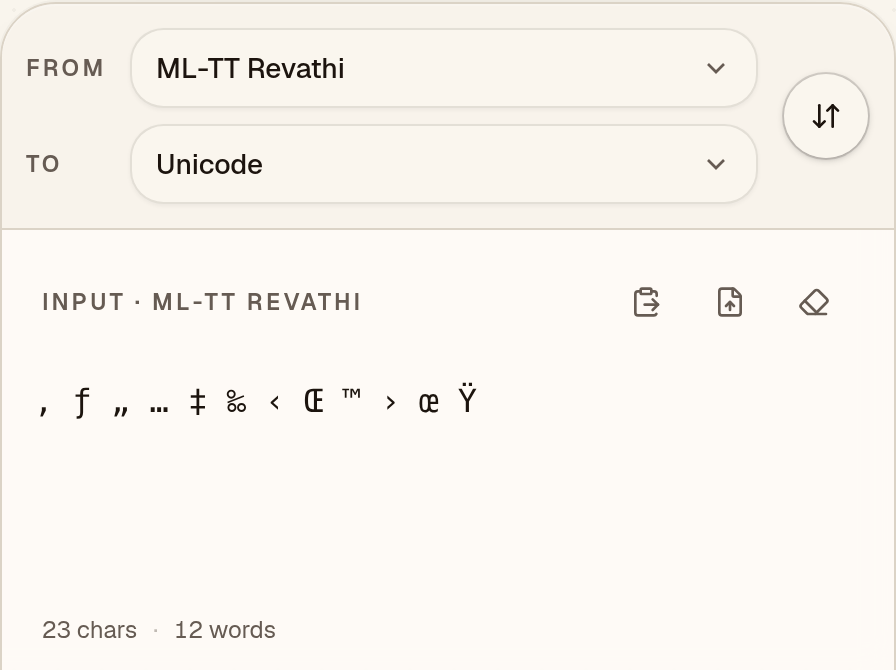
  1. Paste your ML-TT Revathi text

    Check that “From” says ML-TT Revathi, then paste your text. ML-TT Revathi text such as “‚ ƒ „ … ‡ ‰ ‹ Œ ™ › œ Ÿ” looks like a jumble of English letters and symbols until it is converted.
    ML-TT Revathi to Unicode converter with “From” set to ML-TT Revathi and the ML-TT Revathi sample “‚ ƒ „ … ‡ ‰ ‹ Œ ™ › œ Ÿ” pasted into the input box
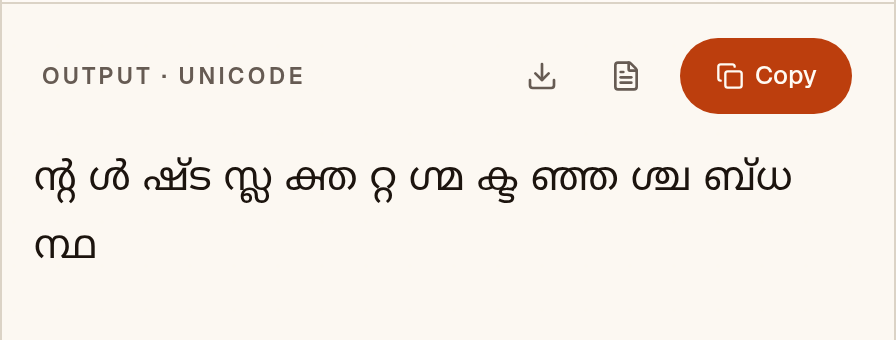
  2. Check the Unicode Malayalam

    The Unicode Malayalam appears as you paste: “ന്റ ൾ ഷ്ട സ്ല ക്ത …”. Nothing in this ML-TT Revathi sample was flagged. When something is, a “notes” button lists it.
    Output box showing the ML-TT Revathi sample converted to Unicode Malayalam: “ന്റ ൾ ഷ്ട സ്ല ക്ത …”
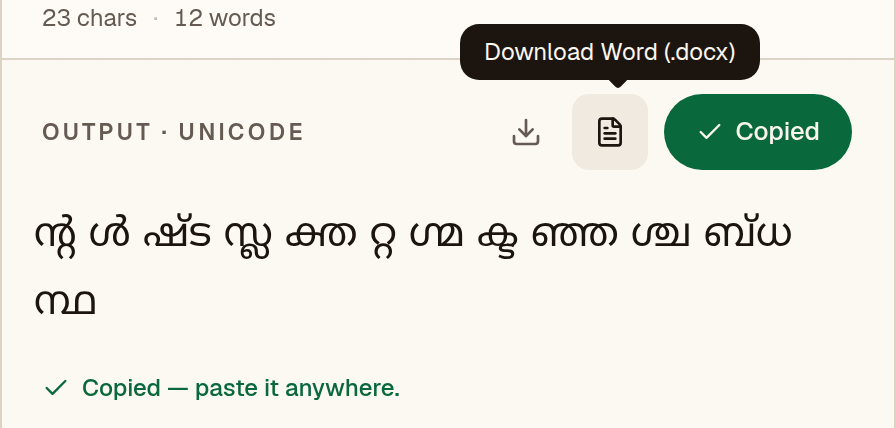
  3. Copy it or save a Word file

    Copy puts “ന്റ ൾ ഷ്ട സ്ല ക്ത …” on your clipboard, ready for WhatsApp, Gmail or Google Docs. The Word button saves a .docx already set in Kartika, so you don’t need ML-TT Revathi to read it.
    ML-TT Revathi to Unicode converter after Copy, with the green “Copied” button, the message “Copied — paste it anywhere.” and the Download Word (.docx) button labelled

Pick a Unicode font. Kartika, Nirmala UI or Noto Sans Malayalam will display the converted text.

Have a whole document instead of a paragraph? The Word file converter keeps tables, bold text and layout.

03 · Output font

Set the output font in MS Word or Google Docs

Unicode text is real Malayalam, so any Malayalam-capable font will display it. Pick one that looks good for your document.

Microsoft Word

  1. 1Paste the converted text, then press Ctrl+A (Cmd+A on Mac) to select everything.
  2. 2On the Home tab, click the font box, type “Kartika” and press Enter.
  3. 3Optional: Review → Language → Set Proofing Language → Malayalam, so spell-check does not underline everything.
  4. 4If the text still shows boxes, install a Unicode font that covers the script, such as Noto Sans Malayalam.

Google Docs

  1. 1Paste the converted text and select it with Ctrl+A.
  2. 2Open the font menu → More fonts, search for “Noto Sans Malayalam” (or Noto Serif Malayalam) and add it.
  3. 3Apply the font. Because the text is Unicode, it also copies cleanly into Gmail, Sheets and Slides.

04 · Mapping chart

Every key, and the letter it makes.

This is the actual table the converter uses, generated from the engine. Search for a key you see in garbled text, or for a letter you want to type.

134 mappings

Click a letter to copy the Unicode character. Click the key cap to copy the ML-TT Revathi key.

05 · Known limits

What to watch for.

  • Legacy fonts store letters in the order they are drawn, not the order they are read. The converter reorders vowel signs and conjuncts, but check the result against the original if accuracy matters.

Coverage in this converter

  • Conjuncts62
  • Consonants37
  • Vowel signs14
  • Vowels13
  • Signs8

Checked against Payyans, the open-source converter this mapping was taken from: 528 of 720 test conversions matched exactly. Of the 192 differences, 73 were errors in that converter and 119 were equivalent spellings. Because the mapping comes from that project, this checks how faithfully it was carried over, not whether the original table is right. See the accuracy page for every difference.

06 · FAQ

Questions about ML-TT Revathi to Unicode

Is my ML-TT Revathi text uploaded to a server?

No. The conversion runs as JavaScript in your browser, so your text never leaves your device. Once the page has loaded, it works offline too.

Which font should I use after converting ML-TT Revathi to Unicode?

Kartika, Nirmala UI or Noto Sans Malayalam will display the converted text. Unicode text is not tied to one font, so you can switch typeface later without converting again.

How accurate is the ML-TT Revathi converter?

It was checked against the converter its mapping came from: 528 of 720 test conversions matched Payyans exactly. Each of the other 192 was reviewed, and 73 turned out to be errors in that converter. No independent converter has confirmed the table itself yet. The sample on this page converts exactly as expected. No fluent-speaker review has been done, so read important text before you print or submit it.