Skip to content
Indian Font Converters

Popular

Type a font name in English or in its own script. Search runs in your browser on a prebuilt index; nothing you type is sent anywhere.

PunjabigurmukhiLegacy → Unicode

AnmolLipi to Unicode Converter

Turn AnmolLipi text that looks like “gurU” into real Punjabi: “ਗੁਰੂ”. Unicode text reads correctly on any phone, browser or search engine.

0 chars0 words
<1 ms
Live conversion Private
20
  • Runs on your device

    Nothing is uploaded. Works offline once loaded.

  • Both directions

    Swap to go Unicode → AnmolLipi in one click.

  • Loss report

    Characters a font can’t show are flagged, not dropped.

  • 108 mappings

    Every one is listed in the chart below.

01 · About the font

AnmolLipi, in plain words.

Convert the verified AnmolLipi / GurbaniAkhar ASCII layout to standard Unicode Gurmukhi.

This profile follows the MIT-licensed Shabad OS mapping and its upstream conversion fixtures. The source explicitly identifies shared AnmolLipi and GurbaniAkhar slots.

AnmolLipi (as stored)

gurU pRBU

Unicode (converted by this page)

ਗੁਰੂ ਪ੍ਰਭੂ

This sample is converted with the same engine as the tool above, when this page was built, and matches the expected text exactly.

Who still uses it

  • 01

    Gurmukhi document editors

    Text stored with the AnmolLipi or GurbaniAkhar ASCII layout.

02 · How to

How to convert AnmolLipi to Unicode (3 steps)

Legacy text only looks like Punjabi on a computer that has AnmolLipi installed. Everywhere else (phones, WhatsApp, websites, search results) it appears as English letters like “gurU”. Converting to Unicode fixes that for good.

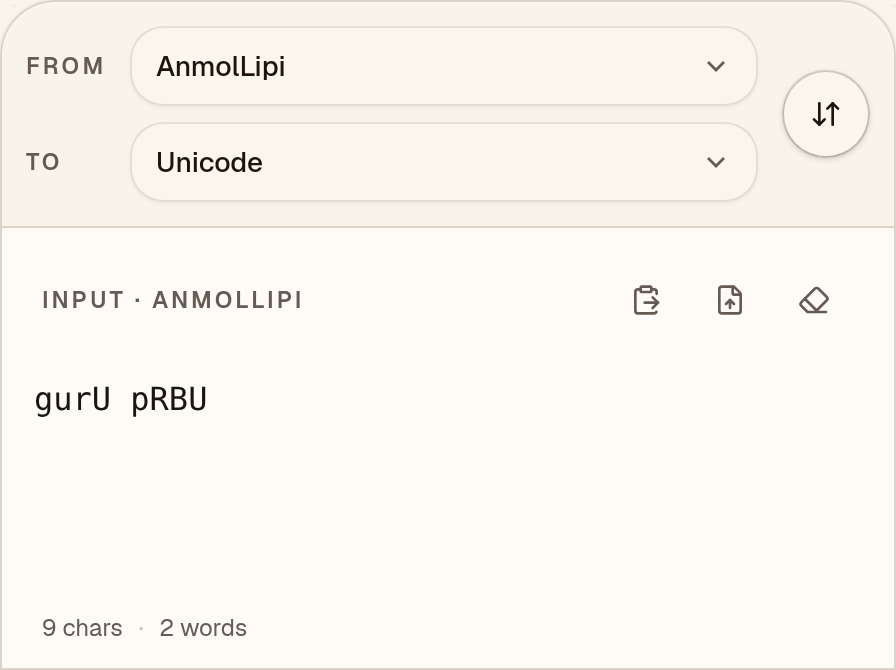
  1. Paste your AnmolLipi text

    Check that “From” says AnmolLipi, then paste your text. AnmolLipi text such as “gurU pRBU” looks like a jumble of English letters and symbols until it is converted.
    AnmolLipi to Unicode converter with “From” set to AnmolLipi and the AnmolLipi sample “gurU pRBU” pasted into the input box
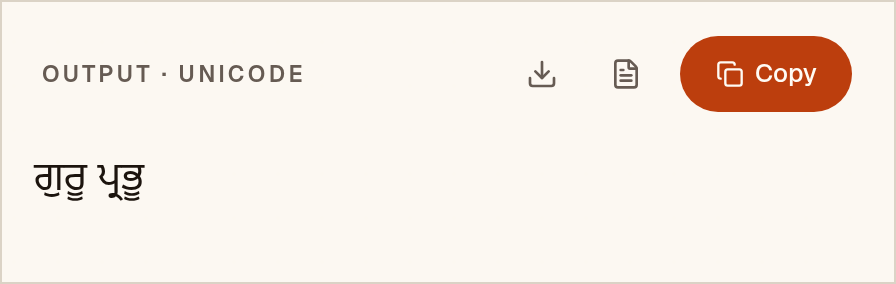
  2. Check the Unicode Punjabi

    The Unicode Punjabi appears as you paste: “ਗੁਰੂ ਪ੍ਰਭੂ”. Nothing in this AnmolLipi sample was flagged. When something is, a “notes” button lists it.
    Output box showing the AnmolLipi sample converted to Unicode Punjabi: “ਗੁਰੂ ਪ੍ਰਭੂ”
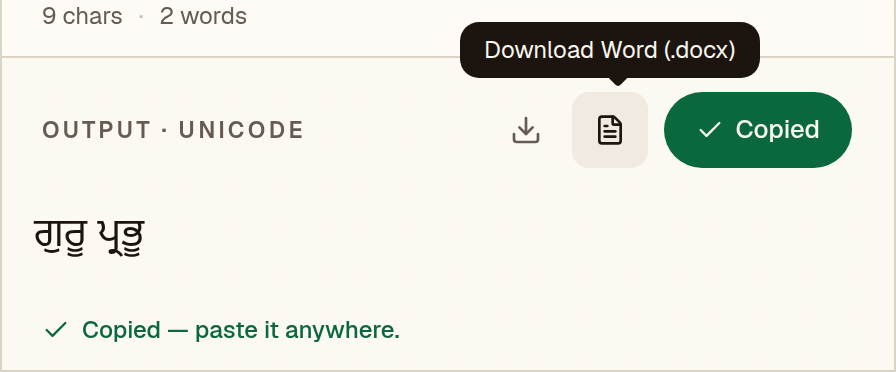
  3. Copy it or save a Word file

    Copy puts “ਗੁਰੂ ਪ੍ਰਭੂ” on your clipboard, ready for WhatsApp, Gmail or Google Docs. The Word button saves a .docx already set in Noto Sans Gurmukhi, so you don’t need AnmolLipi to read it.
    AnmolLipi to Unicode converter after Copy, with the green “Copied” button, the message “Copied — paste it anywhere.” and the Download Word (.docx) button labelled

Pick a Unicode font. Noto Sans Gurmukhi, Noto Serif Gurmukhi or Raavi.

Have a whole document instead of a paragraph? The Word file converter keeps tables, bold text and layout.

03 · Output font

Set the output font in MS Word or Google Docs

Unicode text is real Punjabi, so any Punjabi-capable font will display it. Pick one that looks good for your document.

Microsoft Word

  1. 1Paste the converted text, then press Ctrl+A (Cmd+A on Mac) to select everything.
  2. 2On the Home tab, click the font box, type “Noto Sans Gurmukhi” and press Enter.
  3. 3Optional: Review → Language → Set Proofing Language → Punjabi, so spell-check does not underline everything.
  4. 4If the text still shows boxes, install a Unicode font that covers the script, such as Noto Sans Gurmukhi.

Google Docs

  1. 1Paste the converted text and select it with Ctrl+A.
  2. 2Open the font menu → More fonts, search for “Noto Sans Gurmukhi” (or Noto Serif Gurmukhi) and add it.
  3. 3Apply the font. Because the text is Unicode, it also copies cleanly into Gmail, Sheets and Slides.

04 · Mapping chart

Every key, and the letter it makes.

This is the actual table the converter uses, generated from the engine. Search for a key you see in garbled text, or for a letter you want to type.

108 mappings

Click a letter to copy the Unicode character. Click the key cap to copy the AnmolLipi key.

05 · Known limits

What to watch for.

  • Sihari is stored before its base; pairin ra, ha and va are encoded as subjoined forms.
  • Open-top yayya variants fold to standard Unicode and produce a loss warning.
  • Asees uses a different layout and is not supported by this profile.
  • Decorative extenders and stamps without a verified text equivalent are preserved and flagged.

Coverage in this converter

  • Consonants40
  • Signs20
  • Vowel signs15
  • Vowels12
  • Conjuncts11
  • Digits10

Checked against the Shabad OS JavaScript library, the open-source converter this mapping was taken from: 657 of 720 test conversions matched exactly. All 63 differences were equivalent spellings. Because the mapping comes from that project, this checks how faithfully it was carried over, not whether the original table is right. See the accuracy page for every difference.

06 · FAQ

Questions about AnmolLipi to Unicode

Does this also accept GurbaniAkhar?

It supports the shared slots explicitly identified in the pinned Shabad OS source. Check unusual font variants against the original document.

Is my AnmolLipi text uploaded to a server?

No. The conversion runs as JavaScript in your browser, so your text never leaves your device. Once the page has loaded, it works offline too.

Which font should I use after converting AnmolLipi to Unicode?

Noto Sans Gurmukhi, Noto Serif Gurmukhi or Raavi. Unicode text is not tied to one font, so you can switch typeface later without converting again.

How accurate is the AnmolLipi converter?

It was checked against the converter its mapping came from: 657 of 720 test conversions matched the Shabad OS JavaScript library exactly. Each of the other 63 was reviewed. No independent converter has confirmed the table itself yet. The sample on this page converts exactly as expected. No fluent-speaker review has been done, so read important text before you print or submit it.